
The viewer on this page is a preview of the first 30 pages of this issue. STEP 1: Click the red EXPAND button in the center of the viewer to view the preview at full screen and access options to look at the preview, or to log into your account as a previous subscriber. Click ESC key on your keyboard to exit from full screen mode.
As a new subscriber, after looking at the preview there are two options to purchase the magazine and see the full 192 pages: 1) you may purchase just this single issue of the magazine, for $2.99, or 2) you may purchase a yearly subscription, for $5.99.
1.) To order a single issue of the magazine: you first need to create an account. To do that and to purchase only this single issue, click the blue FULL VERSION button at the bottom center of the cover. Then you will create your account.
2.) To purchase a yearly subscription: you first need to create an account, but you will click the blue SUBSCRIBE button on the left side of the viewer. Then you will create your account.
After clicking either the FULL VERSION to order a single issue, or the SUBSCRIBE button to subscribe for a yearly subscription, a new pop up window will open that looks like this:
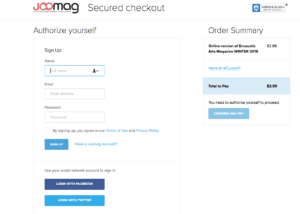
Verify that you have ordered the option you prefer — either a yearly subscription or the single issue purchase by looking under the Order Summary on the top right of this pop up window.
Then create your account by entering your name, email address and password. Agree to the terms of use and click SIGN UP. You will receive a confirmation email from our publisher. The email will have a direct link to the magazine as well as an access code that you may be asked to enter the first time you read the issue. Copy and paste this access code if you are requested to do so. To re-access the magazine after you’ve subscribed, you will follow the steps below.
If you have already subscribed to the magazine, or wish to re-read the magazine: There are two ways you can log into your account and read or re-read the issue. Option 1: Click the i icon on the far left red margin of the viewer. A new page will open, at the very top right of the page you’ll see “LOG IN”, click that to log in to your account and read the issue.
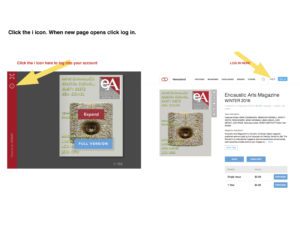
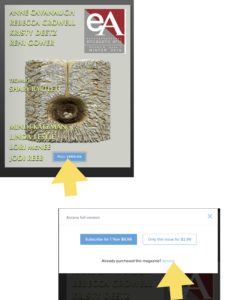
OR Option 2: click the blue FULL VERSION button in the bottom center
of the image of the cover. A new pop up window will appear with options to purchase a subscription.
Under those options you’ll see, “Already purchased this magazine? Access“. Click the blue Access link. Sign into your account to view the full version of this issue.
For more detailed instructions and general information about the magazine click HERE.